
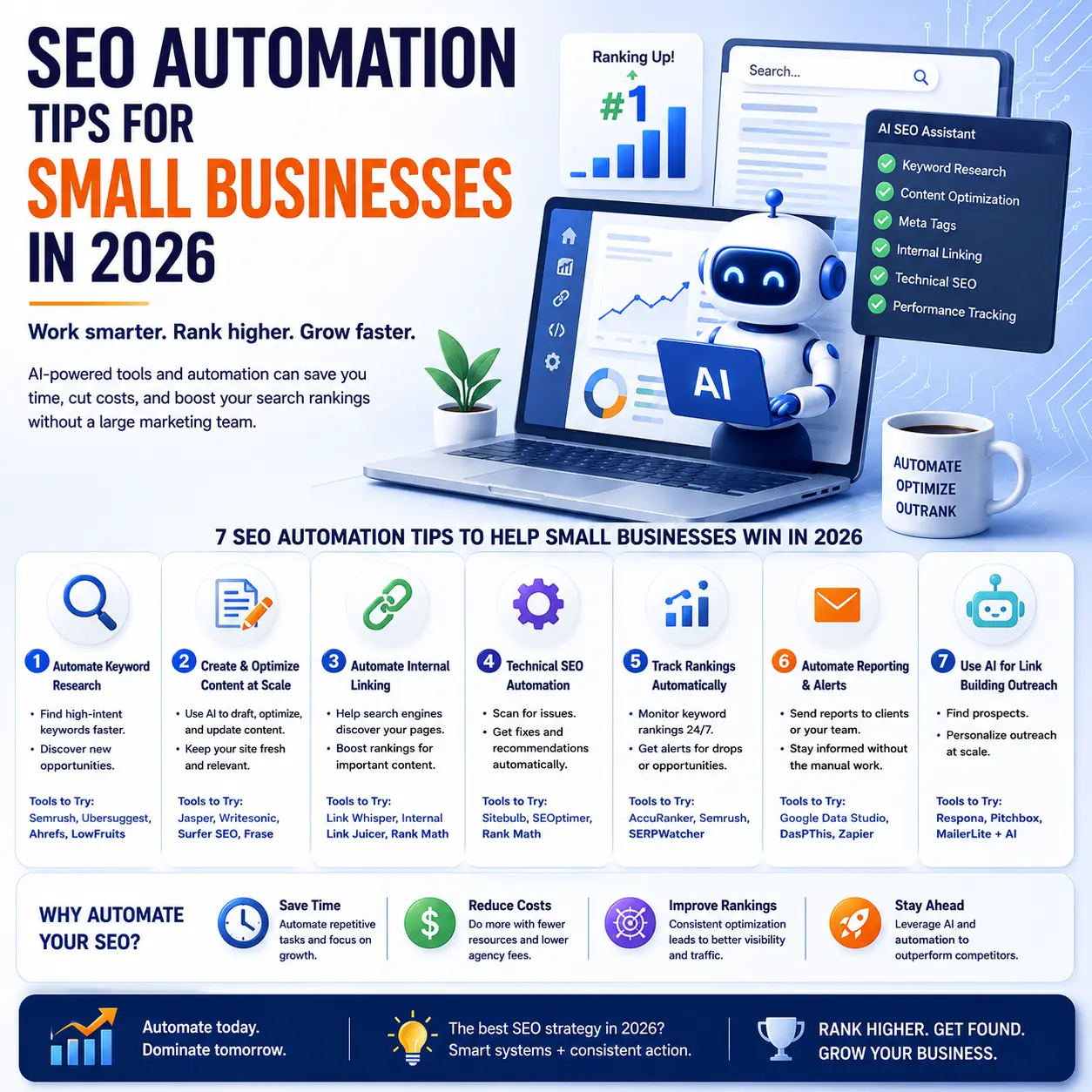
Search engine optimization has become more complex for small businesses. Customers still use traditional Google searches, but they also ask detailed questions through AI Overviews, ChatGPT, Gemini, Perplexity, voice assistants, and other conversational platforms. A business must now make its information understandable to people, search engines, map applications, and AI-powered recommendation systems.
Managing every SEO task manually is difficult. Keyword research, content planning, technical checks, local listings, review requests, internal linking, performance reporting, and content updates can consume hours each week. SEO automation helps reduce that workload by allowing software and artificial intelligence to handle repeatable processes.
However, successful SEO automation is not the same as publishing hundreds of AI-generated pages. Small businesses should automate data collection, alerts, research, quality checks, reporting, and routine updates while keeping human judgment involved in strategy and final approval.
Google continues to emphasize helpful, original, people-first content rather than pages created mainly to manipulate rankings. Its current guidance also states that foundational SEO practices remain important for visibility in generative AI search experiences.
This guide explains practical SEO automation tips for small businesses in 2026, including what to automate, what requires human review, and how to build a system that supports sustainable search visibility.
What Is SEO Automation?
SEO automation is the use of software, artificial intelligence, integrations, and predefined workflows to complete repetitive search optimization tasks with limited manual effort.
For example, a small business can automatically collect Google Search Console data, identify pages losing impressions, send a notification when a page develops a technical issue, and create a task for someone to investigate the problem. The software handles the monitoring and organization, while a person decides what action to take.
Other SEO automation examples include:
- Generating weekly search performance reports
- Monitoring website uptime and page speed
- Finding missing titles or meta descriptions
- Detecting broken internal and external links
- Organizing keyword opportunities by topic
- Creating first drafts of content briefs
- Requesting customer reviews after completed services
- Identifying pages that need updated information
The goal is not to remove people from SEO. The goal is to reduce low-value administrative work so business owners and marketing teams can focus on decisions that require experience, creativity, and knowledge of their customers.
Why SEO Automation Matters for Small Businesses in 2026
Large companies often have separate employees for content, technical SEO, analytics, web development, local listings, and conversion optimization. A small business may have one employee managing all of these areas—or an owner trying to manage marketing between customer calls.
Automation helps create consistency without requiring a large internal department.
An automated system can monitor a website every day, even when nobody has time to manually review it. It can flag unusual traffic changes, identify new search terms, detect pages returning errors, and remind the business to update outdated content.
Automation also makes SEO easier to measure. Instead of logging into several platforms and downloading reports, a business can consolidate its most important metrics into one dashboard. This creates a clearer connection between search visibility, leads, appointments, phone calls, and revenue.
In 2026, this consistency matters because search visibility is no longer limited to a list of blue links. Google recommends maintaining a clear technical structure, publishing valuable non-commodity content, keeping business details accurate, and following established SEO practices for visibility in both conventional and generative search experiences.
Start With Clear SEO Goals Before Automating Tasks
Automation is only useful when it supports a defined business objective. A poorly planned system may generate reports and content without improving leads or sales.
Before choosing automation tools, identify what SEO needs to accomplish for the business. A local electrician may want more emergency service calls. A chiropractor may want more new-patient appointments. An insurance agency may want qualified quote requests. A business-to-business provider may want consultation bookings from decision-makers.
Each objective requires a different workflow.
For example, a local service company may prioritize:
- Improving visibility for high-value service searches
- Ranking in surrounding cities and service areas
- Increasing Google Business Profile activity
- Collecting more legitimate customer reviews
- Converting website visitors into calls or appointments
A national business may focus more heavily on informational content, product comparisons, email capture, industry authority, and lead nurturing.
Establishing the goal first prevents the business from automating tasks that look productive but have little effect on revenue.
Build an Automated SEO Performance Dashboard
One of the best places to begin is reporting. Small businesses often have access to useful data but do not review it consistently.
Google Search Console provides information about search queries, pages, impressions, clicks, click-through rates, indexing, Core Web Vitals, and structured data issues. Its API can query traffic data using filters for pages, queries, devices, countries, search appearances, and date ranges.
An automated dashboard can combine Search Console data with website analytics, call tracking, form submissions, CRM records, and Google Business Profile activity. The dashboard should focus on metrics connected to business results rather than displaying every available number.
Metrics Worth Monitoring
A useful small-business SEO dashboard may include:
- Organic search leads
- Calls and form submissions from organic visitors
- Search impressions for priority services
- Clicks to important service pages
- Conversion rates by landing page
- Branded versus non-branded search traffic
- Local visibility by city or service area
- Pages gaining or losing traffic
- New referring domains
- Website speed and Core Web Vitals
- Indexed versus excluded pages
Schedule the dashboard to update automatically and deliver a weekly or monthly summary. Daily reports are often unnecessary unless the company is launching a website, resolving a serious technical problem, or running a time-sensitive campaign.
Google notes that Search Console does not need to be checked every day. The platform sends notifications when it identifies certain new problems, while periodic reviews can be used to confirm that performance remains stable.
Automate SEO Alerts Instead of Constantly Checking Reports
Dashboards explain what happened. Alerts help a business respond when something requires attention.
Create alerts for events that may affect traffic or lead generation, such as:
- A major service page becoming unavailable
- Organic clicks falling beyond a reasonable threshold
- A page being removed from Google’s index
- A sudden increase in server errors
- A website form stopping submissions
- A significant Core Web Vitals decline
- A high-value keyword losing visibility
- A Google Business Profile detail changing unexpectedly
Alerts should be specific enough to avoid unnecessary notifications. When every minor fluctuation creates an alert, people begin ignoring them.
For example, a 5% decrease in daily traffic may be normal. A 40% decrease sustained over several days may deserve investigation. Thresholds should reflect the website’s normal traffic patterns and seasonal changes.
A useful alert should also include context. Instead of stating that traffic declined, it should identify which pages, devices, locations, or search categories experienced the change. That information reduces the time required to diagnose the problem.
Use AI to Support Keyword Research
Keyword research is a strong candidate for partial automation. AI can organize large sets of phrases, group similar searches, classify intent, and connect topics to the correct website pages.
Start by gathering keyword information from reliable sources, including:
- Google Search Console queries
- Customer questions
- Sales and support conversations
- Google Business Profile insights
- Competitor page topics
- Website search data
- Paid search campaigns
- CRM notes and call transcripts
AI can then cluster the phrases into categories such as informational, commercial, transactional, branded, and local intent.
For example, searches about “how an AI receptionist works” may belong to an educational content cluster. Searches for “AI receptionist service for contractors” show stronger commercial intent and may be assigned to a service page.
The output should be reviewed by someone who understands the business. Automated keyword tools may group phrases that appear similar but represent different customer needs.
Map Keywords to Existing Pages Before Creating New Content
A common SEO mistake is creating a new page for every keyword variation. This can produce thin, overlapping pages that compete with each other.
Google’s guidance for generative AI search specifically warns against creating separate content for every possible variation of how people search. It also explains that publishing a high volume of pages does not automatically make a website more useful or relevant.
Before creating a new page, determine whether an existing page can answer the search effectively. In many cases, improving an established service page is more valuable than adding another nearly identical article.
An automated keyword map can help by assigning:
- One primary topic to each page
- Several closely related supporting terms
- The intended customer and search intent
- Internal links pointing to and from the page
- The page’s conversion goal
- The next review or update date
This creates a more organized website and reduces duplicate content.
Automate Content Briefs, Not Final Expertise
AI can shorten the early stages of content production. It can review a keyword group, identify common questions, suggest a logical outline, and create a preliminary content brief.
A useful automated brief may include:
- Primary and secondary keywords
- Target audience
- Search intent
- Recommended headings
- Questions the page should answer
- Relevant internal links
- Suggested examples
- Conversion goal
- Sources requiring verification
- E-E-A-T elements to include
The brief should then be completed by someone with relevant business knowledge.
For example, an AI tool can outline an article about electrical panel upgrades. A licensed electrician should review the safety information, local requirements, warning signs, and recommendations. Similarly, health, legal, insurance, and financial topics require qualified review because inaccurate advice may cause real harm.
Google describes generative AI as potentially useful for researching a topic and adding structure to original content. However, it warns that producing many automated pages without adding value may violate its scaled content abuse policies.
The safest and most effective approach is to use AI as a production assistant rather than an anonymous expert.
Create a Human Review Process for AI-Assisted Content
Every AI-assisted article should pass through a quality review before publication. This process protects the business from factual errors, duplicated ideas, misleading claims, inconsistent branding, and unnatural wording.
The reviewer should confirm that the content:
- Answers the customer’s actual question
- Contains accurate and current information
- Reflects the company’s real services
- Includes original experience or examples
- Avoids unsupported statistics and guarantees
- Uses the business’s natural tone
- Links to relevant services and resources
- Includes an appropriate next step
- Does not repeat existing website content
- Meets legal or industry requirements
This review process supports E-E-A-T: experience, expertise, authoritativeness, and trustworthiness.
Google explains that trust is the most important part of E-E-A-T. Its people-first content guidance encourages businesses to demonstrate first-hand expertise, maintain a clear purpose, and provide enough information for visitors to achieve their goals.
Add Real Experience That Automation Cannot Invent
Original experience is one of the most valuable additions a small business can make to its content.
A contractor can discuss problems commonly found during inspections. A chiropractor can explain how an assessment changes for different patient needs. An insurance professional can describe coverage misunderstandings that frequently occur during policy reviews. A marketing provider can show how a campaign improved lead response time or appointment rates.
Useful experience signals include:
- Real project examples
- Before-and-after observations
- Expert explanations
- Original photographs
- Customer questions
- Lessons from completed work
- Local conditions
- Industry-specific recommendations
- Case studies with verifiable results
AI can help organize these details, but it should not fabricate them.
Automate Content Refresh Opportunities
Older pages often lose performance because information becomes outdated, search intent changes, competitors publish more complete resources, or the business updates its services.
A content refresh system can identify pages that may need attention based on:
- Declining impressions or clicks
- Lower click-through rates
- Outdated dates, statistics, or references
- Broken links
- Services no longer offered
- Missing internal links
- New customer questions
- Strong impressions but few clicks
- Rankings near the bottom of the first page
- Pages with traffic but poor conversion rates
The automation should create an update queue rather than immediately rewriting every flagged page.
Someone should review each page to determine why performance changed. A declining article may need stronger information, but the problem could also be technical, seasonal, or related to a change in search demand.
Avoid changing publication dates solely to make old content appear new. Google’s people-first guidance specifically identifies changing dates without substantially updating content as a questionable search-first practice.
A legitimate refresh should improve the page with meaningful additions, corrected information, clearer examples, updated visuals, or better answers.
Automate Internal Linking Suggestions
Internal links help visitors discover relevant information and help search engines understand relationships between pages.
As a website grows, manually tracking every internal link becomes difficult. An automation tool can scan new and existing content, identify related pages, and suggest natural anchor text.
For example, a new article about improving local search visibility may link to pages about review management, website optimization, Google Business Profile support, AI SEO services, and content marketing.
The automation should suggest links rather than inserting them without review. Automatic linking can create repetitive anchor text, irrelevant connections, or too many links in one paragraph.
Google advises website owners to make links crawlable and ensure that important pages can be reached from another discoverable page. Descriptive link text also helps people and search engines understand the destination.
A practical internal linking workflow can automatically check whether every new article:
- Links to at least one relevant service page
- Links to one or more supporting resources
- Receives a link from an older related page
- Avoids broken, redirected, or irrelevant URLs
- Uses descriptive anchor text
This process helps prevent valuable content from becoming isolated.
Automate Technical SEO Audits
Technical SEO problems can prevent strong content from being crawled, indexed, displayed, or used effectively.
A scheduled crawler can check the website weekly or monthly for:
- Broken pages
- Redirect chains
- Missing canonical tags
- Duplicate page titles
- Missing meta descriptions
- Blocked resources
- Noindex errors
- Orphan pages
- Oversized images
- Slow-loading templates
- Incorrect sitemap entries
- Structured data errors
- Mobile usability problems
The most important issues should be sent to the person responsible for the website. Lower-priority findings can be added to a maintenance backlog.
Monitor XML Sitemaps
Most modern content management systems automatically create XML sitemaps, but automation should still confirm that the sitemap is accessible, current, and free from invalid URLs.
Google explains that sitemaps help search engines discover and understand website URLs. Sitemaps can be submitted through Search Console, referenced in the robots.txt file, or submitted programmatically through the Search Console API. Google also clarifies that a sitemap is a hint rather than a guarantee that every URL will be crawled or indexed.
A sitemap monitoring system should flag:
- Pages returning errors
- Redirected URLs
- Noncanonical pages
- URLs blocked from indexing
- Deleted pages
- Important pages missing from the sitemap
- Incorrect last-modified dates
Accurate sitemap information is more useful than a large sitemap containing every URL the website has ever created.
Monitor Core Web Vitals Automatically
Website speed and usability affect both search performance and conversion rates. A visitor who waits too long for a page to load may leave before reading the content or contacting the business.
The current Core Web Vitals evaluate loading performance, responsiveness, and visual stability through Largest Contentful Paint, Interaction to Next Paint, and Cumulative Layout Shift. Google’s published “good” thresholds include an LCP of 2.5 seconds or less and an INP of 200 milliseconds or less.
Automated monitoring should review real-world performance across important page types, including:
- Homepage
- Service pages
- Location pages
- Blog articles
- Contact and booking pages
- Landing pages
- Ecommerce or payment pages
Do not rely only on a one-time speed test. Performance can change when plugins are updated, tracking scripts are added, images are uploaded, or website templates are modified.
When an important page moves from “good” to “needs improvement” or “poor,” create an alert and investigate the underlying cause.
Automate Structured Data Validation
Structured data helps systems understand information about a business, service, article, product, event, or other entity.
For small businesses, useful schema types may include Organization, LocalBusiness, Service, Article, BreadcrumbList, Product, and other types that accurately match visible page content.
Automation can validate structured data after website updates and notify the team when required properties are missing or code becomes invalid.
Google recommends JSON-LD for many implementations because it is generally easier to maintain. It also advises testing eligible markup through the Rich Results Test and monitoring deployed pages through Search Console.
Structured data must match what visitors can see. It should not contain fake reviews, misleading ratings, unavailable services, or information unrelated to the page. Google states that structured data should be accurate, relevant, visible to readers, and compliant with its spam and feature-specific policies.
Businesses should also avoid building their entire strategy around a single rich-result feature. For example, Google reported that FAQ rich results stopped appearing in Google Search on May 7, 2026, with related Search Console API support scheduled for deprecation in August 2026.
FAQ content can still help customers and clarify a business’s services, but the content should be valuable even without a special search display.
Automate Local SEO Without Losing Accuracy
Local SEO automation is especially useful for businesses serving specific cities, counties, or neighborhoods.
Business information should remain consistent across the website, Google Business Profile, directories, map services, social profiles, and industry platforms. Automation can help identify differences in the business name, address, phone number, hours, categories, and website links.
It can also create reminders for:
- Holiday hour updates
- New location information
- Service-area changes
- Photo uploads
- Review responses
- Outdated directory profiles
- Unanswered customer questions
- Expired offers or announcements
However, local business information should not be changed automatically without approval. An incorrect address, category, phone number, or operating hour can confuse customers and damage visibility.
Google requires Business Profile content to accurately represent the business and warns that policy violations may restrict content or access to the profile.
Create an Ethical Review Automation Workflow
Customer reviews influence trust, conversion rates, and local visibility. Small businesses can automate the request process after a completed appointment, purchase, or service.
A typical workflow may:
- Mark a job as completed in the CRM
- Wait for an appropriate period
- Send a personalized review request
- Provide a direct link to the review platform
- Send one polite reminder when necessary
- Notify the team when a new review appears
- Create a task to respond
The request should go to real customers without pressuring them to leave only positive feedback. Avoid offering misleading incentives, filtering unhappy customers away from public review platforms, or creating reviews that did not come from genuine experiences.
Responses can use approved templates, but they should be adjusted to reflect the customer’s comments. A repetitive response posted to every review can make the business appear impersonal.
Prepare Content for Traditional and AI-Powered Search
Small businesses do not need separate websites for traditional SEO and AI search. The same foundations remain important: accurate information, clear structure, useful content, crawlable pages, strong internal links, real expertise, and trustworthy business details.
Google’s current generative AI optimization guidance recommends creating valuable, non-commodity content, maintaining a clear technical structure, supporting content with relevant images or video, and keeping local business or product information accurate.
Content should answer questions directly, but it should also provide enough context to be useful. Short definitions alone rarely demonstrate meaningful expertise.
A strong service page may explain:
- Who the service is for
- Which problems it solves
- How the process works
- What customers should expect
- Common limitations
- Pricing factors
- Service areas
- Frequently asked questions
- Evidence of experience
- How to contact the business
These elements help customers make decisions while giving search and AI systems clearer information about the company.
Experimental files or protocols should not replace this work. For example, a business may choose to test an llms.txt file as an additional documentation layer, but it should not be treated as a substitute for accessible content, accurate schema, internal links, and sound technical SEO. Google’s generative AI guidance states that businesses should prioritize established SEO practices over unproven AEO or GEO shortcuts.
Connect SEO Automation to the CRM
SEO should not stop when someone visits the website. The strongest automation systems connect search activity with lead management.
When an organic visitor submits a form, calls the company, starts a web chat, or schedules an appointment, that action should be recorded in the CRM. The business can then track which pages, services, and campaigns produce qualified opportunities.
A connected workflow may:
- Capture the visitor’s requested service
- Assign the lead to the correct employee
- Send an immediate confirmation
- Trigger a text or email follow-up
- Schedule reminders
- Record whether the lead booked
- Track the final revenue
- Request a review after service completion
This information improves future SEO decisions. A blog article may attract significant traffic without producing leads, while a lower-traffic service page may generate high-value appointments. Traffic alone does not reveal that difference.
Perfect Business AI combines AI-powered websites, SEO optimization, CRM tools, automated follow-ups, web chat, smart texting, review management, and booking workflows. Connecting these functions can help small businesses move from measuring rankings to measuring actual customer acquisition.
What Small Businesses Should Not Fully Automate
Some SEO responsibilities require human judgment.
Do not allow automation to independently control:
- Final content approval
- Medical, legal, financial, or safety recommendations
- Major website migrations
- Business Profile identity changes
- Responses to sensitive customer reviews
- Deletion of important pages
- Claims about company results
- Local service-area information
- Brand positioning
- Crisis communication
Automation may provide recommendations, but an accountable person should approve actions that affect trust, safety, revenue, or the company’s public reputation.
A Practical SEO Automation Schedule
A small business does not need to implement every automation immediately. Start with the areas that reduce the most work or protect the most valuable pages.
Daily Automations
Monitor website availability, critical forms, severe errors, major traffic anomalies, and lead routing.
Weekly Automations
Update performance dashboards, identify ranking changes, check broken links, review new customer questions, collect review activity, and flag pages with unusual performance.
Monthly Automations
Run a broader technical audit, review local listings, analyze conversions, identify content refresh opportunities, check Core Web Vitals, and evaluate important service pages.
Quarterly Reviews
Reassess keyword priorities, business goals, competitor changes, service areas, content quality, automation rules, and reporting thresholds. Remove workflows that create noise without improving decisions.
How to Choose SEO Automation Tools
The best platform is not necessarily the one with the most features. Small businesses should choose tools that integrate with their current website, analytics platform, CRM, communication channels, and booking system.
Evaluate each tool based on:
- Ease of use
- Data accuracy
- Integration options
- Approval controls
- Reporting quality
- Security
- Customer support
- Scalability
- Total cost
- Time saved
Avoid paying for several platforms that perform the same function. A smaller connected system is usually easier to manage than a collection of disconnected tools.
Before activating an automation, test it with a limited workflow. Confirm that the trigger works, the correct data transfers, notifications reach the right person, and mistakes can be reversed.
Measure the Business Impact of SEO Automation
The purpose of automation is not simply to publish faster or produce more reports. It should improve efficiency, visibility, lead quality, or revenue.
Measure results such as:
- Hours saved each month
- Faster response to technical problems
- More consistent content updates
- Increased qualified organic leads
- Improved appointment rates
- Higher conversion rates
- Fewer missed inquiries
- Better review response times
- Reduced reporting work
- Increased revenue from organic search
Compare performance before and after implementing each workflow. If an automation creates additional work or produces low-quality output, revise or remove it.
The strongest system is not the one with the most automation. It is the one that reliably handles routine work while helping people make better decisions.
Conclusion
SEO automation gives small businesses a practical way to compete in a search environment that now includes Google results, maps, AI Overviews, conversational assistants, voice searches, and recommendation platforms.
The right approach is to automate repeatable processes such as monitoring, reporting, keyword organization, technical audits, internal link suggestions, review requests, and content refresh alerts. Strategy, expertise, final content approval, and sensitive customer communication should remain under human control.
In 2026, publishing more content is not automatically better. Small businesses need accurate, useful, experience-based information supported by a technically healthy website and consistent business details. Automation should protect and improve those foundations rather than replace them.
Begin with one measurable workflow, such as an automated Search Console dashboard or technical SEO alert system. Review the results, correct weaknesses, and expand gradually. When SEO automation is connected to customer communication, lead follow-up, booking, reputation management, and CRM tracking, it becomes more than a marketing shortcut. It becomes a dependable business growth system.