
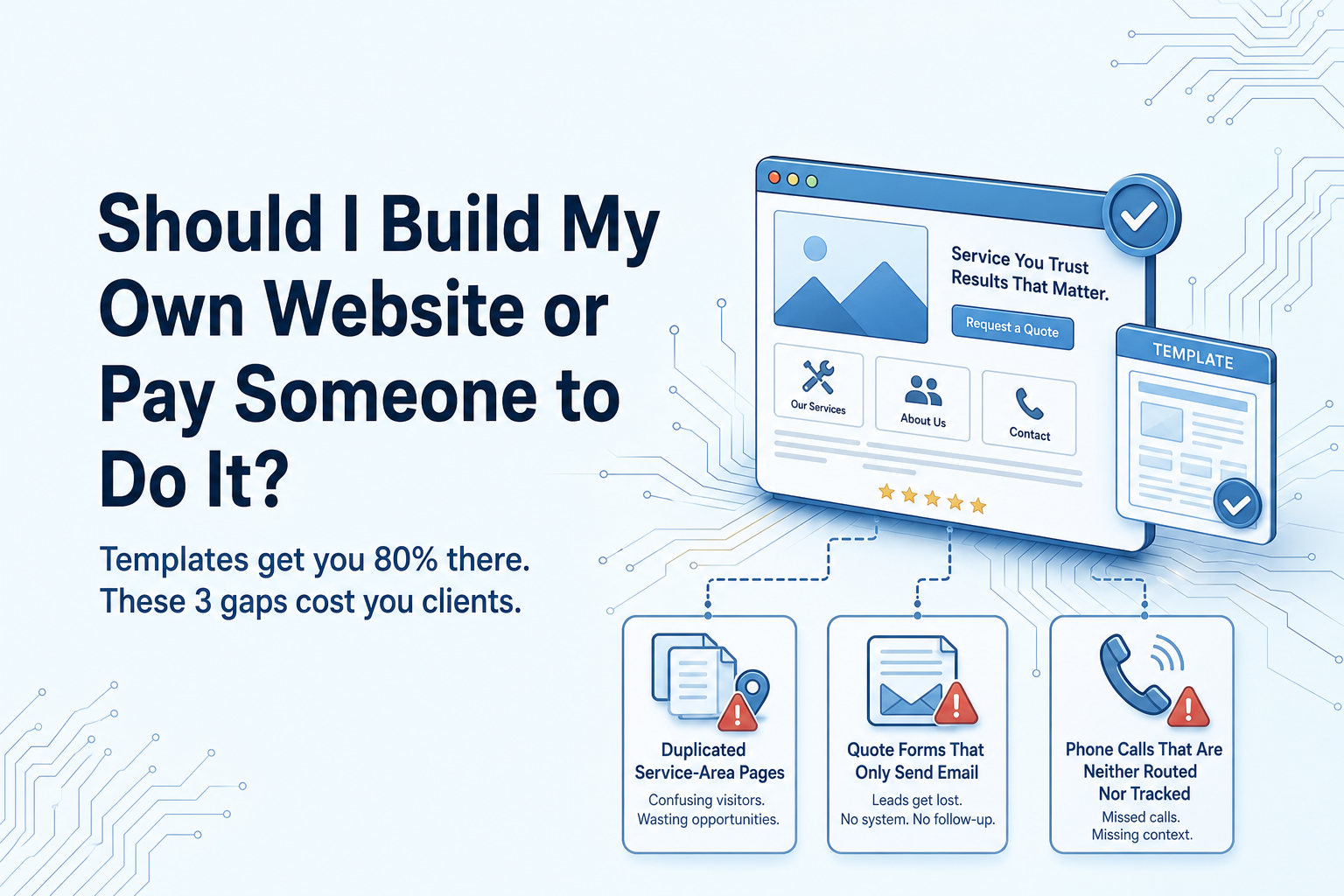
Build it yourself if you have one location, one main service line, a phone that gets answered by a person, and no ad spend pointing at the site. Pay someone once your work depends on the site functioning — several service areas, quote forms that have to reach a CRM, calls you need routed and tracked. The decision isn’t really about design. It’s about who owns the lead path.
Should I build my own website or pay someone to do it? The real question is the lead path
Most owners can make a website look fine. Templates got good. Spacing, fonts, a photo grid, a mobile menu that works — that part of the job stopped being hard years ago. Which is why this argument usually ends in a draw. Ask it on Quora or Alignable, as plenty of owners have, and designers tell you to hire, builder users tell you to save your money, and both camps are answering a question about appearance.
The question that costs you money is different. It’s what happens in the ninety seconds after someone lands on your site. Where does that form submission go? Who sees it, and how fast? If the visitor taps the phone number instead, which phone rings, and what happens if you’re under a sink? Thirty days later, can you say which page or which town produced the three jobs you won?
That chain — stranger searching, page read, form sent or call placed, reply sent, appointment booked, job done — is your lead path. A template handles the first two steps perfectly well. It handles the rest badly, and it handles them badly in three specific, predictable places: service-area pages, quote forms that need to feed a CRM, and call routing and tracking.
So the honest version of the question isn’t whether you can build a website. You probably can. It’s whether the part of the system you can’t easily build yourself is the part your business currently runs on. For some owners it isn’t yet. For others it has been for two years and nobody has said so out loud.
How many hours does building your own website actually take?
Nobody can give you an hour count for your business, and any article that does is guessing. What you can do is price your own time once you know what the tasks actually are. Here is the real list.
Writing the copy. This is the biggest task and the one owners consistently underestimate, because it isn’t really a website task — it’s deciding what you sell, in what order, to whom, and what makes you different from the other four firms in town. A template gives you a text box. It does not tell you what to put in it. Most owners stall here, fill the box with something generic, and never go back.
Gathering photos. Finding job photos that aren’t blurry, aren’t of a customer’s private property without permission, and don’t all show the same van from the same angle. Cropping them. Compressing them so the page isn’t slow on a phone.
Setting up the pages. Home, services, about, contact, and one page per service you actually want to sell. The first page takes the longest because you’re learning the editor. The rest go faster.
Wiring the form and testing it. Not just placing it — submitting it as a customer, from a phone, on mobile data, and confirming the email arrives and doesn’t land in spam.
Domain and email. Pointing the domain, setting up records so your mail doesn’t break, getting the padlock working.
Mobile checks. Every page, on an actual phone, not the preview pane.
The revision loop with yourself. You’ll rewrite the homepage headline four times. This is normal and it is not wasted, but it is hours.
Those you can plan for. Then there are the ones that ambush you. The contact form that quietly stops delivering after a platform update, which you discover when a customer mentions they filled it in last week. The plugin or template update that shifts the layout on one page you don’t visit. The photo that looks sharp on your monitor and takes eight seconds to load on a phone. The renewal you missed. None of these are hard to fix. They are hard to notice, and the cost isn’t the fix — it’s the fortnight of enquiries that went nowhere before you spotted it.
Price it against your own rate. If a Saturday on the site is a Saturday not quoting, that Saturday has a number attached to it. If you’re genuinely quiet and the alternative to building the site is watching TV, it doesn’t.
Where a template genuinely holds up
Here’s the part the agencies skip. For a decent number of local service businesses, building it yourself is the right call, and paying a few thousand for a custom site would be money spent on a problem you don’t have yet.
DIY holds up well when most of this describes you:
- One location, or one town you work in and no serious ambition to expand the radius this year.
- One main service line, maybe two closely related ones.
- Most work arrives by word of mouth, repeat customers, or a trade network — the site is there to make you look legitimate when someone checks you out.
- The phone is answered by a human during working hours, and you already know what happens to the ones that aren’t.
- You’re not spending money on ads pointing at the site.
- Enquiry volume is low enough that nothing gets lost in an inbox.
If that’s you, a template does the job properly. Modern builders give you a clean layout, mobile responsiveness that works without you thinking about it, page speed that’s acceptable out of the box, hosting and security handled, and — the underrated one — the ability to change your own text at nine o’clock at night without emailing anybody. That last point is worth a lot to owners who’ve previously waited three days to get a price changed.
What a template is doing in that scenario is being a credible brochure. Someone has already decided to consider you; the site confirms you exist, shows the work, lists what you do, gives a number. That’s a real job and a template does it well.
If you read that list and nodded at five of six items, stop reading and go build it. Keep it to five pages. Test the form from your phone before you tell anyone it’s live. Come back to this when something on the list stops being true.
The three places a template stops working for a service business
Sites built by owners get sent in for rebuilding all the time, and they fail in the same three places almost every time. It’s rarely the design. The design is usually fine.
One: service-area pages
Every owner expanding their radius arrives at the same idea: duplicate the service page, swap the town name, repeat eleven times. It feels productive. It produces eleven near-identical pages that say the same thing about twelve different places, and search engines treat them roughly the way a customer would — as one page with the nouns changed.
A service-area page earns its keep when it contains things that could only be true of that town. Jobs you’ve actually done there, with photos. Neighbourhoods or districts named because you work in them. Reviews from customers in that area. The realistic response time from your base. The service mix that’s different there — older housing stock, different council requirements, a commercial estate you cover. If you can’t write three honest sentences about working in a town, you probably shouldn’t have a page for it yet.
Symptom you’d recognise: you built the town pages months ago, your traffic is still almost entirely the homepage, and no customer has ever mentioned finding you through them.
Two: quote forms that only email you
A template form sends an email. That’s the whole feature. It doesn’t tag the lead by service type, route an emergency differently from a quote request, send the customer an immediate acknowledgement, create a record anyone can follow up from, or tell you next month how many enquiries you got and how many became jobs.
So enquiries live in your inbox, between supplier invoices and spam. One gets read on site, mentally filed, and never answered. Someone who filled in your form at 7pm hears nothing until Tuesday, by which point they’ve called the next firm on the list. And when the form breaks, nothing announces it — the silence looks exactly like a quiet week.
What should happen instead: submission lands in a CRM as a record with an owner and a status, the customer gets an instant reply confirming you have it, the right person is notified by text if it’s urgent, and follow-up is automatic if nobody has touched it within a set time. That is wiring, not design, and it’s the single most common thing missing from owner-built sites.
Three: calls that aren’t routed or tracked
Most service businesses still win most of their work on the phone, and most owner-built sites put one mobile number on every page. Two things follow. You can’t tell which page, town, or ad produced any call, so you’re guessing about where work comes from. And when you’re on a job, the call goes to voicemail — if it goes anywhere — and the caller rings someone else.
Tracking numbers tell you which page earned the call. Routing sends it to whoever is free, then to a backup, then to a message that texts the caller back automatically so the lead isn’t simply gone.
Symptom: you have no idea how many calls you missed last week. If that number is unknown, it isn’t zero.
If you pay someone, what are you actually buying?
Owners conflate three separate purchases, which is why quotes vary so wildly and why some expensive builds disappoint.
A design. Pages that look like your business rather than a template. Real value, but the smallest part of the commercial outcome.
A working lead system. Copy written for the services you actually want to sell, in the order you want to sell them. Area pages built with real local substance rather than duplicated. The form wired into a CRM with tagging, routing and automatic acknowledgement. Call tracking and routing, including what happens to a missed call. Analytics configured to answer one question: where did that job come from?
Ongoing responsibility. Someone whose job it is to notice when the form stops sending, add the new service page when you start offering it, and keep the thing current.
Ask for all three in the scope, in writing. Then ask these questions, which separate a page-builder from a lead-system partner quickly:
- Where does a form submission go besides my inbox?
- Who gets notified when one arrives, how, and how fast?
- How will I know which page or campaign produced a phone call?
- What happens to a call that nobody answers at 6pm on a Friday?
- Who writes the copy — you, me, or nobody?
- What’s your plan for service-area pages, and how many do you think I should have?
- Can I edit my own text without raising a ticket?
- Do I own the domain, the hosting account, and the content if we part ways?
- If the form breaks in month seven, who finds out, and how?
The common failure is a genuinely good build handed over on a Friday with nobody responsible for it on Monday. The design agency’s job ended at launch, your job never started, and eighteen months later the site is advertising a service you dropped and a form that hasn’t delivered since spring. Decide who owns it before you sign anything — that answer matters more than the price.
The ongoing work nobody budgets for
A website isn’t a purchase, it’s a small standing obligation. After launch, somebody has to add the new service you started offering, build the page for the town you just expanded into, swap in this year’s photos, keep asking customers for reviews and putting the good ones where buyers see them, check the form still delivers, install the platform and plugin updates, renew the domain, and fix whatever an update quietly moved.
None of that is difficult. All of it is forgettable. Which is why the single most common condition of owner-built sites arriving for a rebuild isn’t broken — it’s stale. The prices are two years old. The services list describes a business you no longer run. There’s a team member on the about page who left. The newest photo predates the current van livery. Nothing is wrong, exactly, and that’s the trap: there’s no alarm, so there’s no trigger to act.
If you build it yourself, this work is yours, and the honest question is whether you’ll do it in month fourteen when you’re busy — because month fourteen is when it matters. If you pay someone, the question is whether maintenance is actually in the agreement or whether you’re buying a launch and inheriting the upkeep. Either answer is workable. Not answering it is how a site drifts.
Prep checklist: do this before you build or brief anyone
Do this regardless of which route you choose. It takes an afternoon and it improves the result either way — and if you do hire someone, it cuts the back-and-forth sharply.
- Write your service list in the order you want to sell them. Not alphabetically, not by volume — by what you want more of. This decides your page structure and your homepage headline. Most owners discover their current site leads with their least profitable work.
- List the towns you actually serve, and mark which ones you can prove. Prove means recent jobs, photos, reviews, named streets or districts. The provable ones get a page. The rest wait.
- Decide what a qualified lead looks like. Property type, job size, budget range, distance, urgency. This determines what your form asks and what it’s allowed to filter out — and it stops you building a form that generates work you don’t want.
- Find out how calls are answered right now. Which phone rings, who answers it, what happens at lunchtime, what happens at 7pm, and whether anyone calls back the missed ones. Write the honest answer down. This single item usually reveals more lost revenue than anything on the website itself.
- Gather your proof. Thirty usable job photos, your best reviews, licences, insurance, certifications, years trading, guarantees. Proof is what converts a visitor who’s comparing three firms, and no designer can invent it for you.
- Decide who owns the site in six months. Name a person — you, a staff member, or a provider under an agreement. If the honest answer is nobody, build something small and simple on purpose, or buy the ongoing responsibility as part of the deal.
Every item here changes what gets built. The service order changes the navigation. The provable towns change how many pages exist. The lead definition changes the form fields and the routing rules. The call audit often changes the priority entirely — plenty of businesses need their phone handling fixed more urgently than their homepage.
Three common situations and the straight answer for each
New, one person, no budget. Build it. Five pages, your own words, real photos. Spend your extra effort on one thing only: make sure the form reaches you reliably and that someone replies the same day. Revisit when you’re turning down work or expanding your radius.
Established, steady leads, stale site. Hire — but scope the lead path, not the look. If the brief is “make it modern,” you’ll get a prettier version of the same problem. Ask where the form goes, how calls are tracked, and who owns it in six months.
Spending on ads, or expanding service areas. DIY is already costing you more than it saves. Paid traffic landing on untracked pages with an email-only form means you’re buying clicks and guessing at results.
Next step: do the call audit from the checklist this week. Whatever you find will tell you which of the three you are.